
You have a program that has been running for years, and all your records are inside it. The real value is not in the program: it is in the data itself and in years of accumulated business rules. We rescue that first, then build a modern system on top of it.
Sound familiar?
- The company or person who wrote the program can no longer be reached, and you do not have the source code.
- The database is not a familiar brand; the program has its own closed file format.
- You cannot export the data, report on it or make it talk to another system.
- The program runs on a single computer, often on an old version of Windows.
- There is no remote access and backups are uncertain; if that machine fails, work stops.
Typical examples
These are the situations that come up most often in this kind of work. If yours is not on the list, the approach is still the same.
- A customer and inventory tracking program. Written in the early 2000s, running on a single PC; the balances are correct but they never leave the program. Once the data is recovered, inventory and receivables speak the same language as accounting or the ERP.
- Production and work order tracking. The operator at the machine enters the record into the old program, and the office types the same information into the ERP a second time. Recovered data and a new interface put an end to the double entry.
- Laboratory and quality records. Test results sit in the program’s own file, and whenever a customer asks for a certificate the values are typed out by hand. In a standard database, certificates and traceability reports are produced automatically.
- Service and maintenance tracking. The technician in the field calls the office to learn a machine’s history; the records live on one PC in that office. The new application opens on a phone, and the history is there on site.
- An industry-specific calculation program — cutting optimisation, price and discount rules, formulations. Years of rules are buried inside the program and nobody dares rewrite them. We extract the rules along with the data and verify with sample records that the new system produces the same results.
- Dealer, subscriber or membership tracking written in Access or old Visual Basic. The file is shared over the network, it breaks now and then, and backups are uncertain. Once the data is in a real database, concurrent use and automatic backups stop being a problem.
Having such a program rewritten from scratch is expensive and risky: years of exceptions, calculation rules and habits have to be rediscovered through a fresh analysis. Yet all of it is already recorded inside the data.
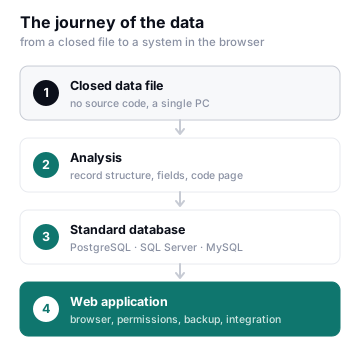
1. Diagnosis — analysing the program and its data file
We identify the technology the executable was written in (Delphi, Visual Basic 6, Clarion, FoxPro, .NET, Java) and analyse the structure of the data file. If the format really is proprietary, we work out the record structure step by step: record length, field positions, number and date encodings, deleted-record markers, and the code page used for local characters.
If the data is held in a protected or compressed form, we take it at the point where the program itself makes it readable while running. When no other method works, the records can as a last resort be extracted in full through the program’s own interface with automation — slow, but it gets there.
At the end of the assessment we tell you plainly which method will work, and whether a single record risks being left behind.
2. Recovery — moving the data into a standard database
The analysed data is loaded into PostgreSQL, SQL Server or MySQL with its relationships in place. Accuracy is not left to guesswork:
- Record counts are compared against the old program.
- Totals (balances, stock quantities, turnover) are worked on until both sides agree.
- Selected sample records are checked screen by screen.
From then on you reach your data with standard tools: Excel, reporting tools, APIs.
3. Transformation — a web application in its place
There are three routes, depending on your needs and budget:
| Approach | Time | Who it suits |
|---|---|---|
| Quick publish | Days | Those who want the program to stay as it is, but be reachable from a browser and from outside the office |
| Data migration + new interface | 2–6 weeks | The most popular route; the data moves to a modern database and the screens are rebuilt on the web |
| Full rewrite | Project-dependent | Those who also want to redesign their processes, grow and build integrations |
Quick publish means putting the program on a server as it is, reached through a remote session: the screens do not change, server and access licences are required, and the recovery work continues separately in the background. It solves the urgent access problem within days, but it does not get your data out of the closed format — which is why most companies choose the second route.
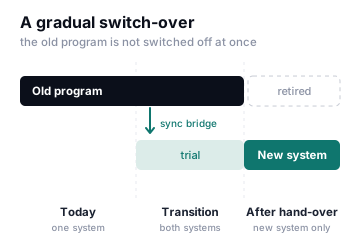
4. A safe switch-over — gradual, not overnight
During the transition the old program keeps running. The sync bridge we build transfers data to the new system at regular intervals, so your team can try the new interface on real data while daily work carries on. Once everyone is ready, writing moves to the new system and the old program is retired.
What you end up with
- All of your data, in an open and standard format
- Documentation of the data structure — your format now belongs to you
- A new application that works from a browser, a phone and outside the office
- User permissions, automatic backups, an access log
- The option to integrate with your existing ERP, e-commerce and accounting systems
The legal basis
This work is not about copying or reselling the program you hold; the purpose is to give you access to your own data and to move that data into another system.
- The work is carried out only at the written request of the business that owns the data, and in its own environment.
- We review the program’s licence agreement together; if there is a restrictive clause, we discuss it before starting.
- The resulting data, documentation and code are yours. Your data is handled under a non-disclosure agreement, and no copy stays with us once the work is finished.
- For the initial assessment, sample or anonymised data can be used instead of production data.
Why erpware
We treat this as a business problem, not a reverse-engineering exercise. Thanks to our development and integration experience on the ERP side, we also know where the recovered data needs to be connected: inventory, accounts, invoicing, production.
- Experience with abandoned systems that have no source code
- Depth in Oracle, PL/SQL, .NET and Web APIs
- Command of ERP integration and business processes
- A gradual approach that does not stop production
Once your data is in a standard database, reporting is the natural next step: with ErpwareBI you build reports and dashboards without writing SQL, and with Kai you can ask questions such as “the ten best-selling products last month” in plain language. If the new application needs to talk to your other systems, the Integration Studio steps in.
How we start
A free initial assessment. We examine your program’s executable and a sample of its data file. Within a few days we tell you:
- Whether the data can be recovered, and by which method
- The estimated time and cost
- The transformation approach we recommend
We do not take on work we do not believe we can solve. If the assessment points the wrong way, we say so openly.
Frequently asked questions
There is no source code at all, only the program itself. Is that still workable?
Yes. Most of our work starts from exactly that point. Source code is a convenience, not a requirement.
We cannot reach whoever wrote the program, and the data file is unreadable. Can it be solved?
In most cases, yes: if the program can open that data, it can be made readable on a machine you are authorised to use. The assessment shows this clearly — and if it does not, we tell you that too.
Do we have to shut the old program down straight away?
No. The switch-over is gradual; the two systems run side by side until your team is comfortable with the new one.
How long does it take?
It depends on how complex the record structure is and how many screens there are. On a typical project, data recovery takes 1–2 weeks and the web application 3–8 weeks. After the assessment we give you a firm timeline.
Where will the data be kept?
On your own server, on a server you rent, or in a cloud environment we manage. The choice is yours.
Will the calculation rules in the old program be lost?
We go through the screens and the rules together so that they are not. The recovered data is also a record of years of business rules: whatever the old program calculates and however it does so, we verify with sample records that the new system produces the same result.
Do you have a program that looks unsolvable?
Let’s talk. The assessment is free, and at the end you get a written answer on what can be done.
Delphi and Clarion, Visual Basic and FoxPro, Oracle, PostgreSQL and MySQL are the property of their respective owners; the names are used here only to identify the technologies.
Read on
- How Much of Your ERP Is Actually Used? Numbers and Lessons from the Field The question to ask before buying a new system
- Operational Excellence (OPEX): The Concept, the Methods, the Indicators Digitising before simplifying