
How Much of Your ERP Is Actually Used? Numbers and Lessons from the Field
A few years after go-live, the question I hear most often in ERP projects is this: “How much of this system do we actually use?”
There is often a large gap between the scope discussed in the selection meeting and the part that is used after go-live. Recent research that measures that gap directly is scarce, but there are recent data that show its causes and consequences. Let me set my own observations aside and look at them.
What does the research say?
Gartner: most ERP projects will miss their goals
Gartner’s prediction is blunt: by 2027, more than 70% of recently implemented ERP initiatives will fail to fully meet their original business case goals, and as many as 25% of these will fail catastrophically. This is a prediction, and the sentence we quote gives no cause. But the direction is clear: most recent ERP projects are not expected to deliver all of the value targeted at the point of purchase.
Usage concentrates in a small group of features
The most recent and broadest usage data comes from Pendo. Its 2024 benchmarks, drawn from 6,800 customers, show that in an average software product 6.4 of every 100 features drive 80% of clicks; even in best-in-class products the figure is only 15.6%.
This does not mean the remaining features are never used; the other 20% of clicks is spread across them. But it shows that most of the value comes from a small core. The lesson for selection: the length of the feature list is a poor indicator of real use.
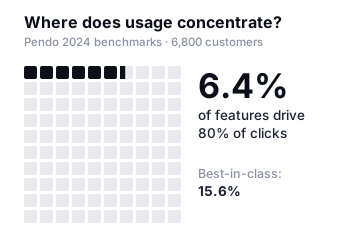
These data cover software in general, not ERP specifically. Pendo lists manufacturing among the industries with the highest feature adoption, so manufacturers may sit above this average. But as it does not publish an industry-specific figure, we cannot put a number on it.
The problem is not the product, it is ownership
The most recent source is Panorama Consulting’s 2026 ERP Report, based on 170 organisations surveyed between January 2025 and January 2026, with a median annual revenue of $200.5 million. The report says:
When it comes to cloud, SaaS and modular ERPs, many vendors can meet baseline functionality requirements. ERP issues are most often related to unclear process ownership, poor user adoption and lack of strategic alignment around project goals.
Three more figures from the same report:
- Fewer than a quarter of organisations reported an intense focus on change management.
- 30% of organisations went over budget (22.9% slightly, 7.1% significantly); 50.6% came in on budget and 19.4% under it. Among those, the most common reason was an unexpected need for additional technology; the report reads this largely as a consequence of poor system selection — the misfit is discovered late in the project, and the company turns to extra software and custom builds.
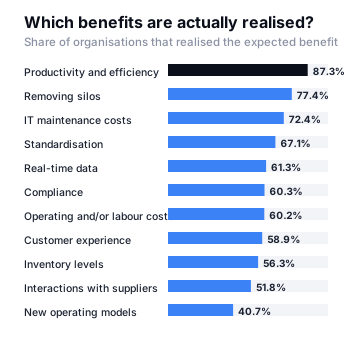
- On the positive side, the share of organisations realising the “removing silos” benefit rose in one year from 55.2% to 77.4%.
The report’s findings on benefits also speak to the selection debate. How often an expected benefit is realised varies sharply by the type of benefit: focused process improvements such as productivity and efficiency usually land, while broad, slow goals such as changing the operating model come last.
Another section heading in the report sums it up: The real challenge begins after the vendor is chosen. The fastest-growing areas of demand for third-party guidance are not selection support, but process, change and life after go-live:

Read together, these findings say one thing: the length of the feature list does not save a project. Ownership, adoption and alignment do — whichever product is chosen.
Old, but still the only direct measurement
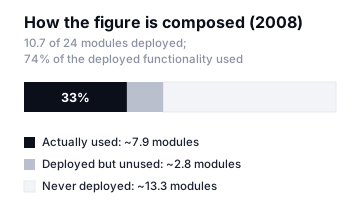
The last large study to measure ERP usage module by module dates back 18 years: Aberdeen Group’s 2008 benchmark of more than 1,200 manufacturers. I could not find a published recent study that measures it this directly, and the recent data above point the same way. So it is better read as a structure than as a current rate.
According to Aberdeen, the average company had deployed 10.7 modules from a catalogue of 24 and was using 74% of what it had deployed. The lesson still holds:
- Companies are not using their deployed modules badly; they use three-quarters of them.
- The real gap is in the modules that were never deployed — the ones bought, or included in the licence, and never switched on.
So the problem is not “users don’t use the system”. It is that a large part of the system that was bought never goes live. Panorama’s field observation today points the same way: its consultants report that it is not uncommon to find nearly a third of an ERP system sitting dormant.
A common selection mistake: looking at scope
Today’s ERPs are powerful software; the problem is usually not quality but fit.
- Scope and usage are not the same thing. The longer the feature list, the more convincing it is in the purchasing meeting. What matters to the business, though, is not the length of the list but the part of it that matches its own processes.
- Scale mismatch. A process designed for a five-thousand-person, multi-country group creates unnecessary steps in a two-hundred-person manufacturer. When those steps weigh on daily work, the work drifts outside the system.
- A good product alone does not mean a good outcome. The same product produces very different results in two companies. The reasons ERP projects fail usually lie in the project, not in the product.
- The reference company may not be like you. “That company uses it too” can overlook the fact that it has its own IT team, its own consultants and its own budget.
- Cost does not end with the licence. Configuration, integration, training, maintenance and upgrades make up the larger part of the total. Panorama’s budget-overrun finding shows how often these items are underestimated.
Why are modules never switched on?
Behind the modules that were never deployed, I see four reasons in the field.
1. Phase 2 never came
When the schedule tightens, scope is cut: “Finance and inventory first, quality and maintenance in the second phase.” The system goes live, the team is tired, priorities change — and the second phase never starts.
2. The master data is not ready
MRP needs bills of material, routings, lead times and stock accuracy; cost accounting needs cost centres and allocation keys. A module whose master data is incomplete is technically switched on but unusable in practice. The results look unreliable, and the user goes back to Excel.
3. The process has no owner
Every module needs an owner: someone who sets the rules, keeps the data current and nudges the users. A module without an owner is abandoned at the first problem. Panorama’s “unclear process ownership” is precisely this — and it does not disappear when the software changes.
4. Training ended at go-live
In most projects, training is a one-off event. Yet the real need comes three months after go-live, when the user who has learned the job asks the right question. When staff change, the newcomer is not taught the system but a recipe: “type this into that screen”. Within a few years nobody remembers how part of the system works.
How should the selection be made?
The right question is not “which ERP is the best?” but “which one meets our processes with the least strain — and which part of it can we genuinely bring to life?”
- Write down the process first, then look at products. As we always say in process consulting: you need to understand the process before you buy software. A comparison made without a needs map is just feature-list reading.
- Write your criteria so they can be measured. “It should be user-friendly” is not a criterion. Write it the CTQ way: “From order entry to approval must take under three minutes.” Then measure it in the demo.
- Ask for the demo on your own data. A canned scenario looks good in every product. Give them your bill of material, your price list, your exception.
- Ask the reference the right question. Not “are you happy?” but “which modules did you buy, and which of them do you actually use today?” Panorama’s remark that it often finds a third of an ERP sitting dormant is why this question matters.
- Tie the purchase scope to a go-live plan. If there is no written answer to “when, by whom and with what data” for a module, do not buy it yet. If modules come as a bundle, discuss scope and price together. If you do buy it, put its timeline and its owner in the contract.
- Go in phases and assign owners from day one. Switching every module on at once is the shortest path to landing none of them.
Measure your own utilisation
What is not measured cannot be managed. You can answer these four questions about your own system today:
- In each module, how many distinct users have done anything in the last three months?
- How many of the modules in your licence have no transactions at all?
- Which reports are opened, and which have never been run?
- Which process starts in the system and ends in Excel?
When this picture is drawn, the result is usually the same: a significant part of what you need is already in your licence — it simply was never switched on. Sometimes the best investment is not a new system, but bringing to life the part of the old one that was never opened.
In closing
None of these numbers say ERP does not work. Panorama’s data show that focused process improvements usually reach their goals. The point is not the size of the system, but how much of it genuinely goes live.
If you have properly landed a third of the system you bought, you are far ahead of a company that bought all of it and landed none. And that is the real question for the selection meeting: Which part of this product will be used, when, and by whom? If there is no answer, do not buy that part yet; if it comes as a bundle, settle the scope together.
How many modules are licensed in your ERP today, and how many are genuinely in use?
Sources
- Gartner, Enterprise Resource Planning (ERP) Insights: prediction that by 2027 more than 70% of ERP initiatives will fail to fully meet their business case goals.
- Pendo, 2024 software benchmarks (6,800 customers, June 2024).
- Panorama Consulting Group, The 2026 ERP Report (170 organisations, January 2025 – January 2026).
- Panorama Consulting Group, How To Unlock Value From Unused ERP Modules.
- Aberdeen Group, The 2008 ERP in Manufacturing Benchmark Report, June 2008 (more than 1,200 manufacturers; historical measurement). Reported by Reliable Plant.