
erpware Builder for Odoo does three jobs in one: it connects IFS and Odoo CRM, lets you design Odoo screens without writing code, and turns IFS reports into dashboards in Odoo. Your sales team works in Odoo; orders, production and accounting stay in IFS.
Sound familiar?
- A salesperson prepares the quote in Excel; once the order is confirmed, someone re-keys it into IFS and figures get lost along the way.
- The same customer is “ABC Machinery Inc.” in the CRM and “ABC MACHINERY IND. TRADE” in IFS — two separate records.
- To find out an order’s status or its invoice number, the salesperson calls accounting.
- Adding a single field to an Odoo form or changing a label means waiting for a developer.
- To track targets, the sales manager pulls a report from IFS every month and builds charts in Excel.
- Giving every salesperson an IFS user account is both expensive and unnecessary; most of them only need to see customers and opportunities.
Why Odoo CRM alongside IFS?
IFS has its own modules for managing customers and sales. This product does not suggest replacing IFS. Odoo CRM is usually a sensible complement when:
- The sales team is large but its ERP needs are small. Field sales staff need a light, mobile-friendly screen, not production and finance screens.
- Odoo is already in use. The company has invested in Odoo for marketing, its website or e-commerce.
- The pre-sales process changes quickly. Stages, fields and screens should be adaptable without opening an IFS project.
- Cost per user matters. A separate, lower-cost licence model is needed for CRM users.
1. Integration: IFS ↔ Odoo CRM
The erpware integration layer sits between Odoo CRM and IFS. Every piece of data has exactly one owner: the owning system changes the data, the other reads it. That is how conflicts and “which one is right?” debates are avoided.
- Customers and products flow in automatically. Only changed records are transferred; the whole list is not moved every time.
- A won opportunity becomes an order or a quotation in IFS. Which one is created, and whether it is routed for approval, follows your own rules.
- Order status and invoice number come back. They are written to the related Odoo opportunity, so salespeople see where the deal stands on their own screen.
- Live IFS data on the form. A customer’s credit limit or recent orders appear on the Odoo form. The value is read from IFS when the form opens and is not copied into Odoo.
- Site/company permissions without extra IFS users. Salespeople see data only for the IFS sites and companies they are authorised for, without an IFS user account being opened for each of them.
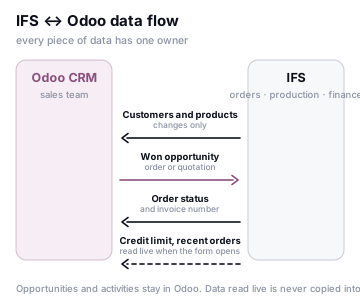
| Data | Owner | Flow | Notes |
|---|---|---|---|
| Leads, opportunities, activities | Odoo | Stays in Odoo | The pre-sales process lives entirely in the CRM |
| Customers, products | IFS | IFS → Odoo | Changes only |
| Won opportunity | Odoo | Odoo → IFS | Opens in IFS as a customer order or a sales quotation |
| Order status, invoice number | IFS | IFS → Odoo | Written back to the related Odoo opportunity |
| Credit limit, recent orders | IFS | IFS → Odoo form | Read live when the form opens, not copied |
2. Screen design: drag and drop, without writing code
The design experience of the erpware Builder family is the same in Odoo: you build the screen with drag and drop in the Designer.
- Fields, tabs, sub-tables, status bar. The form’s structure is built in the Designer: new fields, tabs, line tables and a status bar showing the record’s stage.
- Photo, file, signature, tags, amount. The field types needed in the field come ready to use: product photos, attachments, customer signatures, tags and currency amount fields.
- New app wizard and calendar. A brand-new Odoo app is created with a wizard, and records can be followed in a calendar view.
- Automation: activities, e-mail, reminders. When a record reaches a given stage, an activity is assigned, an e-mail is sent or a reminder is set.
- Download the design as a module and move it from test to production. The design is exported as an Odoo module; it is installed in the test environment first and moved to production once approved. Changes stay traceable and reversible.
3. Dashboards: IFS quick reports in Odoo
Quick reports prepared in IFS open in Odoo as dashboards. The sales team does not switch to IFS to see its numbers, or export them to Excel to build charts.
- KPI, table, chart. The same report can be shown as a KPI card, a table or a chart.
- Target and period comparison. The KPI card shows performance against target, for example “112% — above target”, and periods are compared side by side.
- Who sees what? Visibility is set with Odoo groups and IFS site/company permissions. A regional manager sees only their own site’s figures.
How it works
Without touching the IFS schema
On the IFS side, IFS’s REST/OData APIs or IFS Connect are used; nothing is written directly to the IFS database. Orders and quotations are created through IFS’s own business rules: price, credit and permission checks run just as if a user had entered them in IFS. On the Odoo side, Odoo’s external API (JSON-2 or XML-RPC/JSON-RPC, depending on the version) and webhooks triggered by automation rules are used.
Mapping
Records such as customers, products and units are linked through persistent mapping keys. The same customer cannot be created twice; existing duplicates are reported during the initial load.
Error handling
Every record that cannot be transferred goes into an error queue together with the reason — for example “product is blocked for sale in IFS” or “credit limit exceeded”. Once corrected, the record is resent. No order is ever silently lost.
Traceability
Every transfer is logged with a timestamp, the source record and the result. The answer to “when, and at what price, did this order reach IFS?” is on a single screen.
Odoo CRM compared with popular CRMs
Below are the qualities that make Odoo CRM a strong option alongside IFS. The assessment is a general framework; the right choice depends on your company’s size, sales model and existing systems.
Advantages
- An integrated suite. CRM, quotations, sales, invoicing, inventory and marketing run on the same database. With Salesforce and HubSpot, this level of integration often requires additional products and integrations.
- Open-source core. The Community edition is free and its source code is open, which means less dependence on a single vendor.
- Can run on your own premises. Odoo can be installed on your own servers, so where your data lives (GDPR/KVKK, data residency) stays under your control. Salesforce and HubSpot are offered only as cloud services.
- Cost per user. Compared with Salesforce Sales Cloud and Microsoft Dynamics 365 Sales, the total licence cost is usually significantly lower.
- Flexible customisation. Fields and screens can be added without code; deeper needs are met with Python modules.
- A simple interface. The kanban-based opportunity pipeline is something salespeople get used to quickly.
How the project runs
- Analysis. We map your sales process and the data ownership of both systems, and agree together which data flows in which direction.
- Mapping and clean-up. Customer and product records are matched; duplicates are reported and cleaned up.
- Screen and dashboard design. The sales team’s Odoo screens are arranged in the Designer, the IFS fields they need are added to the forms, and IFS quick reports are connected to dashboards.
- Pilot. The solution is trialled on live data with one sales team or one product group; the error queue and reports are monitored together.
- Roll-out. The design module is moved to production and the whole team goes live; transfer logs and alerts are switched on.
Other members of the family
erpware Builder comes in a dedicated edition for each ERP, one that understands that system’s structure. To design IFS screens, see erpware Builder for IFS Applications; for the whole family, see erpware Builder.
With Odoo and IFS data together, the sales funnel can be measured end to end: ErpwareBI reports conversion rates from opportunity to invoice, and with Kai you can ask questions in plain language, such as “what is the total value of opportunities waiting at the quotation stage this quarter?”.