
How to Automate Financial Reporting with Codex
Codex is OpenAI's coding agent. The sentence "it automates financial reporting" is true, but not in the way it is often imagined: Codex is not a reporting program and does not "know" your report. What it does is write and run the scripts that pull, transform, check and package the data, following your description. The distinction matters, because it decides where the work speeds up and where a person has to stay.
The same approach can be built with other coding agents such as Claude Code; the flow below is tool-independent. I use Codex for the examples because OpenAI's own finance team has described, in public sources, using it in month-end work.
What it automates, and what it does not
Most of financial reporting is really data work: export the trial balance, map accounts to groups, compare with last month, find the variances, drop the table into the template. Each of these steps can be done by a script; the problem until now was finding someone to write the scripts. That is exactly what a coding agent solves: the finance person describes what they want in plain language, the agent writes the necessary Python or Excel code, runs it, and fixes it when it fails.
What it does not do is just as clear:
- It makes no accounting decisions. Which account belongs to which group, whether an expense is capitalised, is decided by the accountant; the agent applies the rule.
- It does not write back to the ERP. Not because it cannot, but because that is the setup decision. In the reporting flow the agent only reads from the ERP; the result leaves as a file or a presentation.
- It does not replace the review. The agent writes the script and can write the checks too; a person gives the "this report is correct" approval.
The monthly flow, step by step
Here is a flow that can be set up for a manufacturing company's monthly management report. For each step I note what the agent does and what the person does.
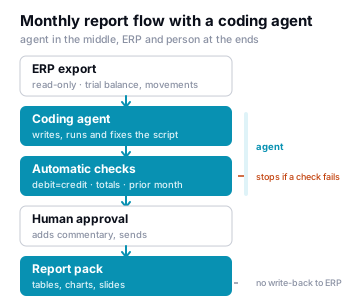
1. Export the data. The trial balance, account movements and, where needed, sales and stock summaries come out of the ERP as CSV or Excel. If possible, keep that export as a saved report definition in the ERP so the agent sees the same file layout every month. If a direct database connection is to be given, give it through a read-only view with personal-data fields left out.
2. Describe the job. In the first month this is the longest step, and it is done once. Write it as you would brief a colleague:
From the attached trial balance, produce an income statement by account group. The account-to-group mapping is in
chart-of-accounts.xlsx. Compare with last month's file; list separately every line that moves by more than five percent. If debit and credit totals do not match, stop and tell me.
3. The agent writes and runs the script. Codex reads the brief, writes a Python script, runs it, sees and fixes the error, and produces the result tables. Your job here is to look at the first output and say "that line landed in the wrong group"; the agent corrects the mapping file or the script.
4. The checks. This step is the real subject of this article. Producing a report is easy; knowing that it is correct is hard. Have the agent write these checks in the first job, and let them run automatically every month:
- Do the trial balance debit and credit totals match?
- Does the income statement total agree with the sum of the result accounts in the trial balance?
- Compared with the previous month, is there a jump that nothing explains?
- Is there an account code missing from the mapping file?
If any check fails, the script produces no report and says where it stopped. That behaviour is worth more than the speed of the report.
5. Approval and presentation. If the checks pass, the agent places the tables and charts into the report template. Producing the presentation file can be part of the same script. Then a person looks, writes the commentary, and sends it. I am not recommending a setup where the agent "sent the monthly report to management"; the send button stays with a person.
After the second month: making it repeatable
Once the flow has run once, there is no need to rewrite the brief every month. Codex has three mechanisms for this, all described in OpenAI's own documentation.
- Skills. A skill packages the instructions, supporting files and scripts for one job, so the agent does that job the same way every time. "Monthly income statement" becomes a skill, is shared within the team and goes into version control. Skills work the same way in the command line, the IDE and the desktop app.
- Plugins. The unit for distributing skills; where needed, a plugin also carries the data warehouse or business application connections in the same package. It lets the finance team read from a connected source instead of exporting by hand every time.
- Scheduled tasks and cloud runs. The documentation describes background tasks that keep working between conversations and bring the result back for you to review. For the monthly report the practical meaning is: on the morning of the first working day the script runs, and the check results and the draft report are waiting for you. The agent brings the result back "for review"; it does not send it.
The documentation also covers subagents, for splitting a long job into parts and running them in parallel. The monthly report rarely needs this; a year-end pack with many parts might.
What OpenAI's own finance team did
The most-cited example of this approach is OpenAI's own finance team. According to a CFO Dive report from September 2026, director of product finance Kyle Kober automated the monthly reporting and analysis of computing capacity costs with Codex; the hard part was matching product-usage data with accounting records. By Kober's own estimate the process went from about five days to about five hours. The same report notes that this is one company's self-reported account and that it does not describe how the outputs were validated against accounting standards; I pass it on with the same caution.
OpenAI Academy also has sessions on how the finance team uses Codex for month-end slides, custom dashboards and journal entry preparation; the session on automating presentation updates deals separately with source control, traceability and human review. So even in the vendor's own telling, the flow is "the agent produces, a person reviews".
What to watch on the ERP side
Four questions need answers before a coding agent is brought near financial data. They do not depend on the tool; they are the principles from our security page applied to the finance flow.
- Which data goes to the agent? Summary data at trial balance level is not the same as customer and employee records. Fields the report does not need are removed from the export. Is the agent running locally or in the cloud? If the cloud is used, the scope is defined in writing.
- With which permissions does the agent run? Permission modes, a sandboxed working environment and command approval are separate chapters in the Codex documentation. In the finance flow the agent's file-system write and network access are deliberately limited; write access to the ERP is never granted.
- Is there a record? Which script ran, on which data, when, and what it produced. The enterprise edition exposes audit events through a compliance interface; in a small setup the script's own log is enough, as long as it exists.
- How does the script go into production? Code written by the agent is reviewed like code written by a person and goes into version control. Running the old method in parallel for the first months and comparing the two results is the cheapest way to measure trust.
A few glossary terms are useful here: human-in-the-loop, agent hooks and reasoning effort. The last one matters for cost: a routine transformation script needs low effort; the effort setting is how you avoid paying more every month for the same job.
Where to start
Do not try to automate the whole close. Pick one report: the one that eats the most manual effort and has the clearest rules. In most companies that is the sales and cost summary broken down by region or product group. Produce that report with the agent for one month and with the old method for one month; if the difference shows, add the second report. Do not say "eighty percent faster" without measuring; what you measure is the only convincing number you can give yourself or management.
Last word
A coding agent gives the finance team a new ability: to build its own data flow without waiting for a programmer. But without a setup that keeps the report's correctness, the data boundary and the send button with a person, that ability can turn into a fast error generator. Set up properly, it removes the three dullest days of the monthly report and leaves the finance team time for commentary.
For indicators that are watched continuously, a reporting layer such as ErpwareBI is a better fit than a coding agent; the agent shines in one-off transformations and in repeating packs with clear rules. The two are not rivals; they are the two ends of the same flow.
Where these tools are used in financial services today, compiled from OpenAI's own customer stories, is in a separate article: How OpenAI's products are used in financial services
Sources
- OpenAI, Codex documentation — skills and plugins, scheduled tasks, cloud runs, subagents, permission modes, sandboxing, compliance interface and audit events.
- OpenAI, Agent Skills — what a skill is and where it runs.
- CFO Dive, Inside OpenAI's experiment with AI coding in finance, September 2026 — the computing-cost reporting described by Kyle Kober; the time estimate is the company's own account.
- OpenAI Academy, Codex for Finance: Faster Reports, Dashboards, and Decisions and Make Work Flow: Automation of Finance Presentation Updates with Codex — the finance team's use cases, version control and human review.
- Fortune, OpenAI CFO: Not knowing AI tools like Codex is now a dealbreaker for finance hires, June 2026 — the change in expectations for finance teams.
Codex and ChatGPT are products of OpenAI; Claude Code is a product of Anthropic. This article is an independent practice note; product features are taken from the vendors' published documentation and may change over time.